Running an affiliate campaign across countries from a single link
Route each country to the offer that pays best there, split-test offers, cap clicks, and keep bots out of your funnel.
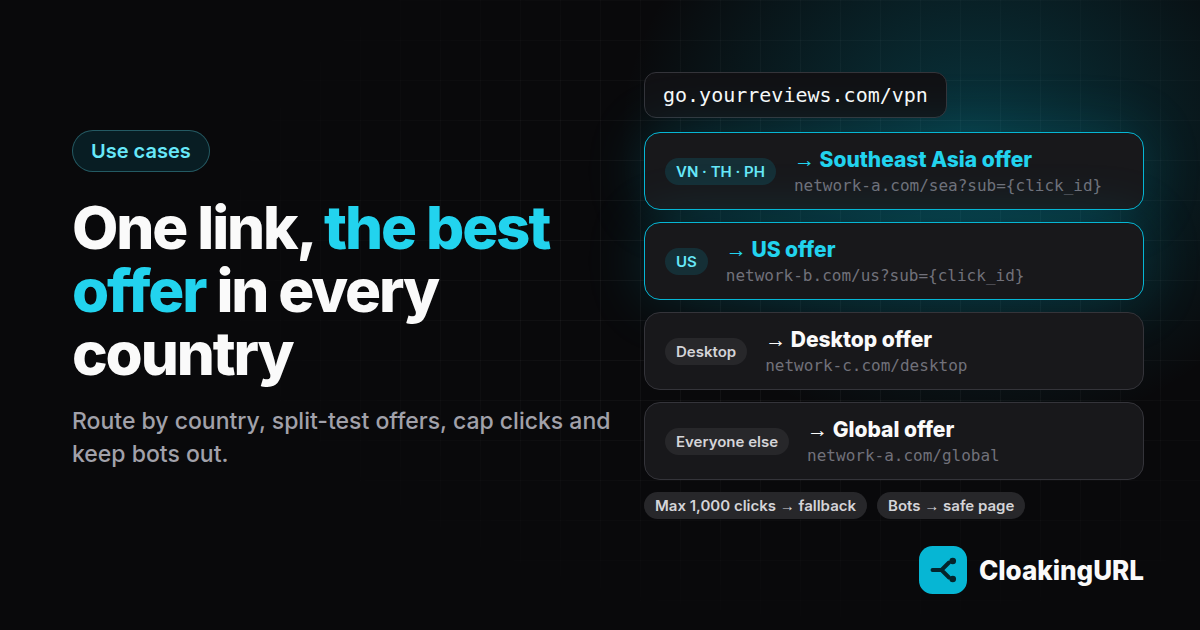
Affiliate offers rarely work everywhere. One network pays well in Vietnam, another in Thailand, a third only accepts US traffic. Here is how to run all of it behind one branded link, so your content, videos and posts never need to change when the offers do.
1. Put the link on your own domain
Start with a subdomain such as go.yourreviews.com. Links on your own domain look trustworthy, and you are never locked into a shortener's domain. Connecting one takes a single CNAME record; the custom domains guide shows the exact values.
2. Route by country
Create go.yourreviews.com/vpn with a global offer as the default destination, then add country rules (Starter plan and up):
- country is VN, TH, PH → the Southeast Asia offer
- country is US → the US offer
- country is DE, FR, IT → the Europe offer
Each country can be in one rule, so there is no order to get wrong. Visitors whose country can't be determined fall through to the default. That's a safe place for them.
3. Test two offers against each other
For traffic that no rule caught, add two variants on the A/B testing tab, say two different global offers at 50/50, sticky per visitor (how splits work). Put a sub-ID in each URL so the networks report them separately. After a week, compare earnings per click in each network dashboard and move the weight to the winner.
4. Respect caps with click limits
Some offers are capped, for example 1,000 clicks for a launch promo. On the Schedule & limits tab set Max clicks to 1,000, On limit to Serve fallback, and the fallback destination to your evergreen offer. When the cap is hit, the link quietly switches over. Tip: bots and link previews count as clicks too, so leave some headroom. The same settings power flash sales that end on time.
5. Keep bots out of your funnel
Scrapers, SEO crawlers and chat-app preview bots all follow links. On Pro and up, bot filtering sends them to a safe page of your choice (your review article, for example) while people go through your routing as normal. It keeps offer URLs out of scraper databases, and keeps crawler hits off the network's reports. Link cloaking explained covers how bots are detected and how to pick a good safe page.
Use it to protect your links, not to hide what people will see. Showing ad reviewers different content from real visitors breaks most networks' policies (see Google's ad network abuse policy) and our Terms of Service.
6. Change offers without re-posting
Offer paused? Payout changed? Edit the rule's target URL and save. The change applies on the next click. Your YouTube descriptions, pinned posts and printed QR codes keep working.
Checklist
- Own domain connected and active.
- Country rules, one per offer region.
- A/B split for the rest, with a sub-ID per variant.
- Click cap and fallback where the offer is capped.
- Bot filtering with a sensible safe page.
Guides: smart routing, A/B testing, schedule & limits, cloaking & bot filtering.