Flash sales that end on time: expiring links with a graceful fallback
Schedule a link to go live and expire on its own, and send latecomers to a useful page instead of an error.
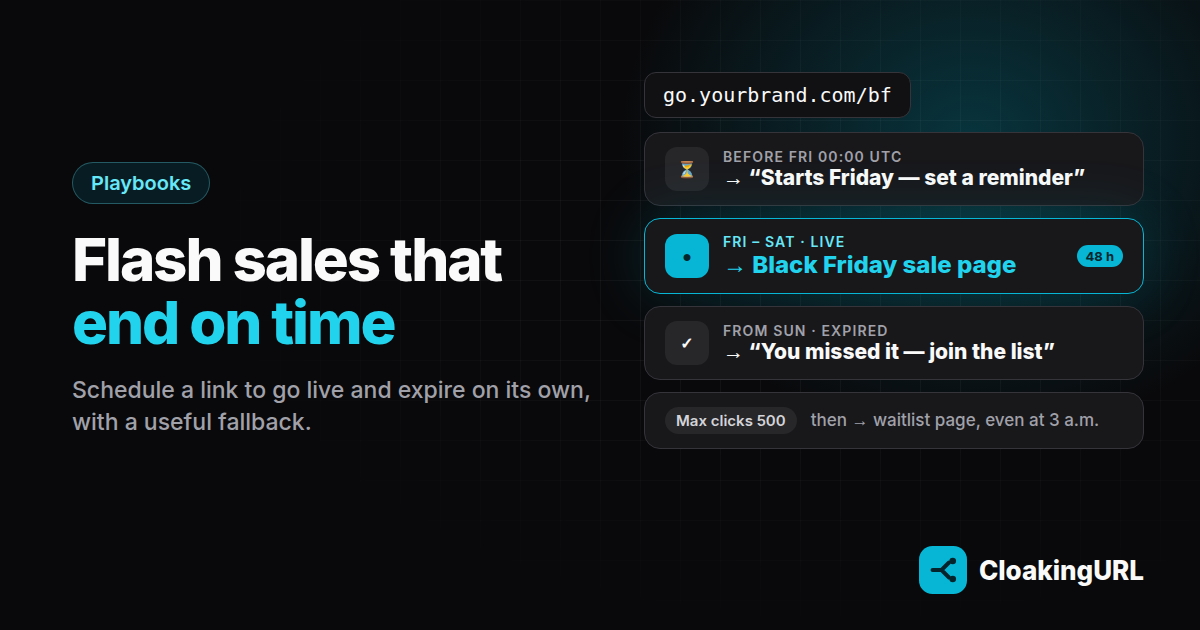
A sale that “ends at midnight” but keeps working for three more days teaches customers that your deadlines don't mean anything. A sale link that just errors after midnight is worse: people who click a week-old post land on a dead page. Scheduled links fix both.
What you can schedule
On a link's Schedule & limits tab (Starter plan and up for expiry and click caps):
- Active from: the link only redirects from this moment.
- Expires at: it stops after this moment.
- Max clicks: it stops after this many clicks.
- On limit / expiry: what happens outside that window. Serve fallback redirects to a URL you choose; Return 404 shows “Link not found”.
All times are in UTC, so convert from your local time. 00:00 in Vietnam (UTC+7) is 17:00 UTC the day before.
Example: a 48-hour Black Friday sale
You announce the sale a week early, and want the link in the announcement to work from the first day.
- Create
go.yourbrand.com/bfpointing to the sale page. - Set Active from to Friday 00:00 and Expires at to Saturday 23:59 (in UTC).
- Set On limit / expiry to Serve fallback with
yourbrand.com/sale-endedas the fallback.
Before Friday, people who click the announcement see the fallback page. Make it say “Starts Friday, set a reminder”. During the sale they get the sale page. From Sunday on, they get the same fallback page, now saying “You missed it, join the list for the next one”. One link, three moments, no manual switching at midnight.
Example: the first 500 get the gift
A giveaway with a limited stock:
- Max clicks: 500 (a little more than the stock, since link previews and bots also count as clicks; on Pro, bot filtering sends bots to a safe page so the clicks go to people).
- On limit: Serve fallback → your waitlist page.
When the limit is reached the link switches over on its own, even at 3 a.m.
Pausing by hand
Sometimes you need to stop early: the stock ran out, or a price was wrong. The Active / Paused switch at the top of the link takes it offline straight away and applies the same on-limit action, so visitors still land on your fallback page.
Make the fallback page work for you
The fallback isn't an error page; it's a second chance:
- an email sign-up for the next sale,
- your bestsellers at full price,
- a countdown to the next event.
Running a capped offer across several countries? Combine click caps with country routing. Read the full schedule & limits guide for every option.